How to run a car rental business from one app
Terms, licence details, bonds, inspections and weekly billing for long rentals, all in one place. Here's how I'd set up a car rental business on Signd, start to finish.
Tom - Founder of Signd
If you rent out cars, you know the job isn't handing over keys. It's everything around it. Checking licences, chasing a bond, working out who else is driving, arguing about a scratch that was "already there", and remembering to bill the bloke who's had the HiAce for six weeks.
I put together a short video that runs through the whole thing in Signd, from setting up to getting the keys back. Watch it first, then read on for the bits I'd want to know if I was running a car rental business.
https://www.youtube.com/watch?v=tdh-ZTjLtQ4
There's also a step by step car rental guide with annotated screenshots if you'd rather follow along.
Set up once
Do this bit properly and every rental after it runs the same way.
Your terms. Go to Settings, then Terms. Type them in, or tap Import PDF if you've already got them in a PDF from your lawyer. Signd turns it into formatted text in the editor, so you just check it over. It saves as you go. Put in the stuff that actually causes fights: who can drive, fuel, kilometres, tolls and fines, and what happens with damage.
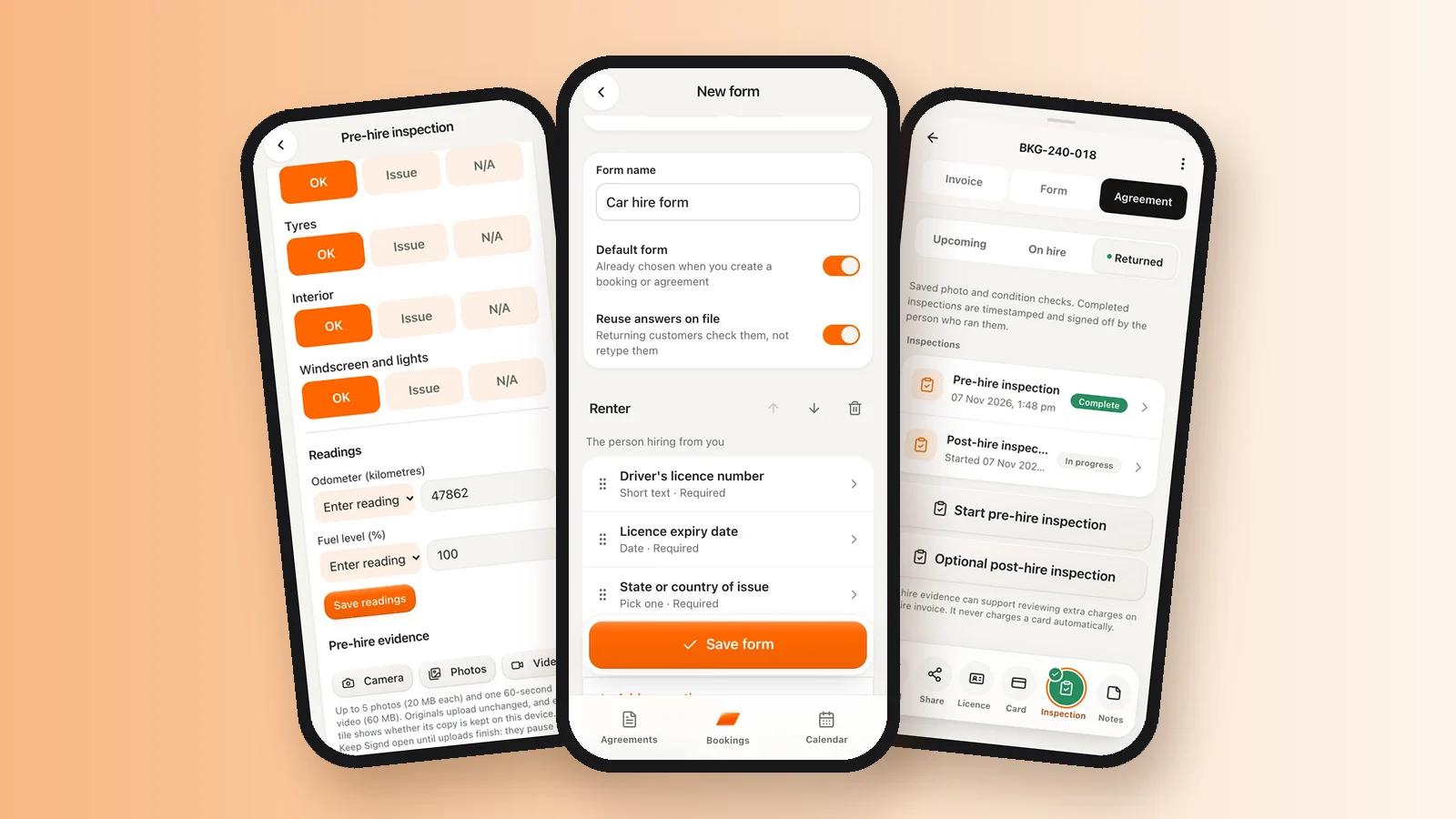
The car hire form. This is the one that saves me the most back and forth. In Settings, Forms, start from the Car hire template. Out of the box it asks for:
- the renter's licence number, licence expiry, state or country of issue and date of birth
- up to 3 extra drivers, each with their name, mobile and licence number
- photo ID (front and back of their licence), a passport if they're visiting from overseas, and proof of address
Change any of it to suit. Leave Default form on and it's picked on every new booking, so you never forget to send it.
Damage waiver. Choose a percentage of the rental or an amount per day, add an excess per incident if you want one, and make the waiver terms your own. Your customer chooses whether to add it when they sign, and they can say no thanks. It's your waiver and your terms, so get them checked.
A checklist for your cars. Settings, Inspections, New checklist. I'd keep it short: body and paint, tyres, interior, windscreen. Then turn on Distance (in kilometres) and Fuel level, so every inspection asks for the odometer and the fuel.
Team, payments and Xero. Invite staff from Team members. Connect Stripe or Square so you can take cards (Square connects from Settings, Integrations on the website), and connect Xero if you use it so invoices and payments land in your books without anyone typing them in.
Repeat billing. If you do long rentals, set how often you bill (weekly, fortnightly or every 4 weeks), add a failed payment fee if you charge one, and write your payment terms. More on this in the repeat billing guide.
Book a car
Tap New booking, or hold and slide across the calendar. Pick the car, then the start date.
Here's the bit long rental operators will like. If you don't know when it's coming back, tap No end date. Repeat billing turns on by itself, and Signd bills them every week (or whatever you picked) until the car comes back. No more spreadsheet of who owes what.
Bonds on long rentals. Tap Add line, choose Custom line and call it Bond. It goes on the first invoice with the first week. On Review you can flip between the first invoice and the ongoing invoices, and you'll see the ongoing ones are just the hire, so they're usually less.
Holds on short rentals. For a weekend hire you can take a security hold on their card instead of a bond. Just know a hold usually lasts up to about 7 days and can't be extended, so it's no good for anything longer. That's why I use a bond line for long rentals.
Your car hire form is already picked on Review, and the damage waiver offer is there too. On the send step, Card on file is already on because of repeat billing. Choose email or a link, and send it.
What your customer does
They get one link. On it they:
- fill in the car hire form, including licence photos and any extra drivers
- read and sign your agreement, save their card, and choose the damage waiver or not
- agree to your payment plan and terms, ticking each one
- pay the first invoice
A word on licence checks. Signd collects the licence details and photos, but it doesn't verify anyone's identity for you. When they turn up, check the licence in their hand matches the photo and the person. Same goes for any extra drivers. For overseas renters, the passport question is there so you've got it on file before they arrive, not at the counter while the next customer waits.
Hand over the keys
Before the car goes out, open the booking, tap Agreement, then Inspection, and start a pre-hire inspection. Mark each check OK, Issue or N/A, enter the kilometres and fuel, and take photos all the way round. Do the wheels and the windscreen. Those are the two that come up most.
It takes a couple of minutes, and it's the best two minutes of the whole hire. When there's a dispute later, you're not relying on memory. You've got dated photos and readings.
Then hand over the keys.
Get the car back
When it comes back, set the booking to Returned and tap Optional post-hire inspection. It's compared with the pre-hire one, and each reading shows what it was at pickup, so the kilometres driven and fuel used are right there. If it's come back a quarter tank down, you'll know before they've left the yard.
All good? Refund the bond the same way it was paid, minus any charges:
- Paid by card through Signd: open Payment, find it in Payment history and tap Refund. You can refund the full amount or part of it.
- Paid through Square: tap Refund on the payment under Card payments: Square.
- Paid by cash or transfer: return it the same way, then record it with Refund given.
- A security hold: release it, or capture what you need.
The bonds guide has more on both ways of taking a bond.
A few things I've learned
- Put fuel and kilometre rules in your terms in plain words. "Return it with the same fuel" beats a paragraph nobody reads.
- Always do the pre-hire inspection, even for a regular. Especially for a regular.
- If you're not sure when a car's coming back, use No end date. It's much easier than extending a booking every week.
- Don't use a security hold for a long rental. It'll drop off before the car comes back.
If you run hire cars, vans or utes and you're still doing this on paper, give it a go. You can start free at signd.com.au and set up your first car hire form in a few minutes.
Tom